Tuesday, July 14, 2015

नयां संविधानको मस्यौदाको सामान्य अध्ययन पश्चात मैले पेश गरेको राय सुझावहरु

नयां संविधानको मस्यौदाको सामान्य अध्ययन पश्चात मैले मेरो व्यक्तिगत तर्फबाट पेश गरेको राय सुझावहरु

मित्रहरु मेरो यो सुझावको अध्ययन गरि चित्त नबुझेमा वा नमिलेको जस्तो लागेमा अथवा परिमार्जन गर्नु पर्ने जस्तो लागेमा कमेन्टमा लेखिदिनु होला । साथै चित्त बुझेमा सक्दो शेयर गरिदिनु होला । तपाईहरुको अमुल्य सुझावको अपेक्षा गर्दछु ।

१. प्रदेश/राज्यहरुको आयश्रोत र त्यसको व्यवस्थापन पद्धतीको बारेमा स्पष्ट पार्नु पर्ने ।

२. रोजगारीको हक सबै बेरोजगार युवाहरु रोजगारीको ग्यारेन्टी लाई अधिकारको रुपमा स्थापित गर्नु उचित हो तर त्यस्को व्यवस्थापन गर्न सक्ने क्षमता संघिय / प्रान्तिय सरकारसंग हुन सक्ला ? जबकि प्रत्येक आ.ब. मा सरकारले प्रश्तुत गर्ने बजेटको श्रोत बैदेशिक ऋण/अनुदान आदिमा निर्भर हुन्छ ।

३. संघिय प्रान्तिय संसद हुनको निमित्त न्युनतम योग्यताको निर्धारण अनिवार्य गरिनुपर्ने । ताकि आगामी पुस्ताहरु पढाईमा असफल भएकाहरु राजनितिमा लाग्ने वातावरण बन्न नसकोस ।

४. जग्गाको हदवन्दी कायम गरी हदभन्दा बढी जग्गा तथा जमिन हुने हरुको जमिन सरकारले उच्च स्तरिय आयोग गठन गरि स्वामित्व ग्रहण गर्ने । सो जग्गा भुमिहिन सुकुम्वासीहरुलाई समान रुपमा वितरण गर्ने,  अथवा अहिलेको सामुदायिक वनको अवधारणा जस्तै सामुहिक खेतीपाती प्रणाली अवलम्वन गरेमा उपयुक्त हुने । क्रान्तिकारी भुमिसुधार जस्ता कुराहरुलाई व्यवहारमा उतार्ने कुराको ग्यारेन्टी संविधानमै गर्नुपर्ने ।

५. बाबुको सम्पतिको एकतिहाई मात्र उसको सन्तानहरुले प्राप्त गर्ने । बांकी सम्पति संघिय/प्रान्तिय सरकारको स्वामित्वमा ल्याउनुपर्ने ।

६. नेपाल राष्ट्र भित्र जन्मेको वा नेपाली नागरिकको सन्तान भएर जन्मेको बालकको सम्पुर्ण शिक्षा, स्वास्थ्य, पोषण लगायत त्यो बालक बालिग भएपछि रोजगारीको ग्यारेन्टी समेत सरकारले जिम्मा लिनुपर्ने ।  उदाहरणको लागि विकसित देशहरुको अनुशरण गर्न सकिने ।

७. नेपाल र भारतको खुल्ला सिमाना तुरुन्त बन्द गर्नु पर्ने साथै एक अर्को देशका नागरिकलाई एक अर्को देशमा काम गर्नको निमित्त परमिटको व्यवस्था गर्नु पर्ने ।
                www.sitaramphuyal.blogspot.com

Friday, June 13, 2014

Very useful Short Cut Keyboard key in daily life.


More than 100 Keyboard Shortcuts must read
SHARE IT........

Keyboard Shorcuts (Microsoft Windows)
1. CTRL+C (Copy)
2. CTRL+X (Cut)
3. CTRL+V (Paste)
4. CTRL+Z (Undo)
5. DELETE (Delete)
6. SHIFT+DELETE (Delete the selected item permanently without placing the item in the Recycle Bin)
7. CTRL while dragging an item (Copy the selected item)
8. CTRL+SHIFT while dragging an item (Create a shortcut to the selected item)
9. F2 key (Rename the selected item)
10. CTRL+RIGHT ARROW (Move the insertion point to the beginning of the next word)
11. CTRL+LEFT ARROW (Move the insertion point to the beginning of the previous word)
12. CTRL+DOWN ARROW (Move the insertion point to the beginning of the next paragraph)
13. CTRL+UP ARROW (Move the insertion point to the beginning of the previous paragraph)
14. CTRL+SHIFT with any of the arrow keys (Highlight a block of text)
SHIFT with any of the arrow keys (Select more than one item in a window or on the desktop, or select text in a document)
15. CTRL+A (Select all)
16. F3 key (Search for a file or a folder)
17. ALT+ENTER (View the properties for the selected item)
18. ALT+F4 (Close the active item, or quit the active program)
19. ALT+ENTER (Display the properties of the selected object)
20. ALT+SPACEBAR (Open the shortcut menu for the active window)
21. CTRL+F4 (Close the active document in programs that enable you to have multiple documents opensimultaneou sly)
22. ALT+TAB (Switch between the open items)
23. ALT+ESC (Cycle through items in the order that they had been opened)
24. F6 key (Cycle through the screen elements in a window or on the desktop)
25. F4 key (Display the Address bar list in My Computer or Windows Explorer)
26. SHIFT+F10 (Display the shortcut menu for the selected item)
27. ALT+SPACEBAR (Display the System menu for the active window)
28. CTRL+ESC (Display the Start menu)
29. ALT+Underlined letter in a menu name (Display the corresponding menu) Underlined letter in a command name on an open menu (Perform the corresponding command)
30. F10 key (Activate the menu bar in the active program)
31. RIGHT ARROW (Open the next menu to the right, or open a submenu)
32. LEFT ARROW (Open the next menu to the left, or close a submenu)
33. F5 key (Update the active window)
34. BACKSPACE (View the folder onelevel up in My Computer or Windows Explorer)
35. ESC (Cancel the current task)
36. SHIFT when you insert a CD-ROMinto the CD-ROM drive (Prevent the CD-ROM from automatically playing)

Dialog Box - Keyboard Shortcuts
1. CTRL+TAB (Move forward through the tabs)
2. CTRL+SHIFT+TAB (Move backward through the tabs)
3. TAB (Move forward through the options)
4. SHIFT+TAB (Move backward through the options)
5. ALT+Underlined letter (Perform the corresponding command or select the corresponding option)
6. ENTER (Perform the command for the active option or button)
7. SPACEBAR (Select or clear the check box if the active option is a check box)
8. Arrow keys (Select a button if the active option is a group of option buttons)
9. F1 key (Display Help)
10. F4 key (Display the items in the active list)
11. BACKSPACE (Open a folder one level up if a folder is selected in the Save As or Open dialog box)

Microsoft Natural Keyboard Shortcuts
1. Windows Logo (Display or hide the Start menu)
2. Windows Logo+BREAK (Display the System Properties dialog box)
3. Windows Logo+D (Display the desktop)
4. Windows Logo+M (Minimize all of the windows)
5. Windows Logo+SHIFT+M (Restorethe minimized windows)
6. Windows Logo+E (Open My Computer)
7. Windows Logo+F (Search for a file or a folder)
8. CTRL+Windows Logo+F (Search for computers)
9. Windows Logo+F1 (Display Windows Help)
10. Windows Logo+ L (Lock the keyboard)
11. Windows Logo+R (Open the Run dialog box)
12. Windows Logo+U (Open Utility Manager)
13. Accessibility Keyboard Shortcuts
14. Right SHIFT for eight seconds (Switch FilterKeys either on or off)
15. Left ALT+left SHIFT+PRINT SCREEN (Switch High Contrast either on or off)
16. Left ALT+left SHIFT+NUM LOCK (Switch the MouseKeys either on or off)
17. SHIFT five times (Switch the StickyKeys either on or off)
18. NUM LOCK for five seconds (Switch the ToggleKeys either on or off)
19. Windows Logo +U (Open Utility Manager)
20. Windows Explorer Keyboard Shortcuts
21. END (Display the bottom of the active window)
22. HOME (Display the top of the active window)
23. NUM LOCK+Asterisk sign (*) (Display all of the subfolders that are under the selected folder)
24. NUM LOCK+Plus sign (+) (Display the contents of the selected folder)

MMC COnsole Windows Shortcut keys

1. SHIFT+F10 (Display the Action shortcut menu for the selected item)
2. F1 key (Open the Help topic, if any, for the selected item)
3. F5 key (Update the content of all console windows)
4. CTRL+F10 (Maximize the active console window)
5. CTRL+F5 (Restore the active console window)
6. ALT+ENTER (Display the Properties dialog box, if any, for theselected item)
7. F2 key (Rename the selected item)
8. CTRL+F4 (Close the active console window. When a console has only one console window, this shortcut closes the console)

Remote Desktop Connection Navigation
1. CTRL+ALT+END (Open the Microsoft Windows NT Security dialog box)
2. ALT+PAGE UP (Switch between programs from left to right)
3. ALT+PAGE DOWN (Switch between programs from right to left)
4. ALT+INSERT (Cycle through the programs in most recently used order)
5. ALT+HOME (Display the Start menu)
6. CTRL+ALT+BREAK (Switch the client computer between a window and a full screen)
7. ALT+DELETE (Display the Windows menu)
8. CTRL+ALT+Minus sign (-) (Place a snapshot of the active window in the client on the Terminal server clipboard and provide the same functionality as pressing PRINT SCREEN on a local computer.)
9. CTRL+ALT+Plus sign (+) (Place asnapshot of the entire client window area on the Terminal server clipboardand provide the same functionality aspressing ALT+PRINT SCREEN on a local computer.)

Microsoft Internet Explorer Keyboard Shortcuts
1. CTRL+B (Open the Organize Favorites dialog box)
2. CTRL+E (Open the Search bar)
3. CTRL+F (Start the Find utility)
4. CTRL+H (Open the History bar)
5. CTRL+I (Open the Favorites bar)
6. CTRL+L (Open the Open dialog box)
7. CTRL+N (Start another instance of the browser with the same Web address)
8. CTRL+O (Open the Open dialog box,the same as CTRL+L)
9. CTRL+P (Open the Print dialog box)
10. CTRL+R (Update the current Web )
Photo: More than 100 Keyboard Shortcuts must read
SHARE IT........

Keyboard Shorcuts (Microsoft Windows)
1. CTRL+C (Copy)
2. CTRL+X (Cut)
3. CTRL+V (Paste)
4. CTRL+Z (Undo)
5. DELETE (Delete)
6. SHIFT+DELETE (Delete the selected item permanently without placing the item in the Recycle Bin)
7. CTRL while dragging an item (Copy the selected item)
8. CTRL+SHIFT while dragging an item (Create a shortcut to the selected item)
9. F2 key (Rename the selected item)
10. CTRL+RIGHT ARROW (Move the insertion point to the beginning of the next word)
11. CTRL+LEFT ARROW (Move the insertion point to the beginning of the previous word)
12. CTRL+DOWN ARROW (Move the insertion point to the beginning of the next paragraph)
13. CTRL+UP ARROW (Move the insertion point to the beginning of the previous paragraph)
14. CTRL+SHIFT with any of the arrow keys (Highlight a block of text)
SHIFT with any of the arrow keys (Select more than one item in a window or on the desktop, or select text in a document)
15. CTRL+A (Select all)
16. F3 key (Search for a file or a folder)
17. ALT+ENTER (View the properties for the selected item)
18. ALT+F4 (Close the active item, or quit the active program)
19. ALT+ENTER (Display the properties of the selected object)
20. ALT+SPACEBAR (Open the shortcut menu for the active window)
21. CTRL+F4 (Close the active document in programs that enable you to have multiple documents opensimultaneou sly)
22. ALT+TAB (Switch between the open items)
23. ALT+ESC (Cycle through items in the order that they had been opened)
24. F6 key (Cycle through the screen elements in a window or on the desktop)
25. F4 key (Display the Address bar list in My Computer or Windows Explorer)
26. SHIFT+F10 (Display the shortcut menu for the selected item)
27. ALT+SPACEBAR (Display the System menu for the active window)
28. CTRL+ESC (Display the Start menu)
29. ALT+Underlined letter in a menu name (Display the corresponding menu) Underlined letter in a command name on an open menu (Perform the corresponding command)
30. F10 key (Activate the menu bar in the active program)
31. RIGHT ARROW (Open the next menu to the right, or open a submenu)
32. LEFT ARROW (Open the next menu to the left, or close a submenu)
33. F5 key (Update the active window)
34. BACKSPACE (View the folder onelevel up in My Computer or Windows Explorer)
35. ESC (Cancel the current task)
36. SHIFT when you insert a CD-ROMinto the CD-ROM drive (Prevent the CD-ROM from automatically playing)

Dialog Box - Keyboard Shortcuts
1. CTRL+TAB (Move forward through the tabs)
2. CTRL+SHIFT+TAB (Move backward through the tabs)
3. TAB (Move forward through the options)
4. SHIFT+TAB (Move backward through the options)
5. ALT+Underlined letter (Perform the corresponding command or select the corresponding option)
6. ENTER (Perform the command for the active option or button)
7. SPACEBAR (Select or clear the check box if the active option is a check box)
8. Arrow keys (Select a button if the active option is a group of option buttons)
9. F1 key (Display Help)
10. F4 key (Display the items in the active list)
11. BACKSPACE (Open a folder one level up if a folder is selected in the Save As or Open dialog box)

Microsoft Natural Keyboard Shortcuts
1. Windows Logo (Display or hide the Start menu)
2. Windows Logo+BREAK (Display the System Properties dialog box)
3. Windows Logo+D (Display the desktop)
4. Windows Logo+M (Minimize all of the windows)
5. Windows Logo+SHIFT+M (Restorethe minimized windows)
6. Windows Logo+E (Open My Computer)
7. Windows Logo+F (Search for a file or a folder)
8. CTRL+Windows Logo+F (Search for computers)
9. Windows Logo+F1 (Display Windows Help)
10. Windows Logo+ L (Lock the keyboard)
11. Windows Logo+R (Open the Run dialog box)
12. Windows Logo+U (Open Utility Manager)
13. Accessibility Keyboard Shortcuts
14. Right SHIFT for eight seconds (Switch FilterKeys either on or off)
15. Left ALT+left SHIFT+PRINT SCREEN (Switch High Contrast either on or off)
16. Left ALT+left SHIFT+NUM LOCK (Switch the MouseKeys either on or off)
17. SHIFT five times (Switch the StickyKeys either on or off)
18. NUM LOCK for five seconds (Switch the ToggleKeys either on or off)
19. Windows Logo +U (Open Utility Manager)
20. Windows Explorer Keyboard Shortcuts
21. END (Display the bottom of the active window)
22. HOME (Display the top of the active window)
23. NUM LOCK+Asterisk sign (*) (Display all of the subfolders that are under the selected folder)
24. NUM LOCK+Plus sign (+) (Display the contents of the selected folder)

MMC COnsole Windows Shortcut keys

1. SHIFT+F10 (Display the Action shortcut menu for the selected item)
2. F1 key (Open the Help topic, if any, for the selected item)
3. F5 key (Update the content of all console windows)
4. CTRL+F10 (Maximize the active console window)
5. CTRL+F5 (Restore the active console window)
6. ALT+ENTER (Display the Properties dialog box, if any, for theselected item)
7. F2 key (Rename the selected item)
8. CTRL+F4 (Close the active console window. When a console has only one console window, this shortcut closes the console)

Remote Desktop Connection Navigation
1. CTRL+ALT+END (Open the Microsoft Windows NT Security dialog box)
2. ALT+PAGE UP (Switch between programs from left to right)
3. ALT+PAGE DOWN (Switch between programs from right to left)
4. ALT+INSERT (Cycle through the programs in most recently used order)
5. ALT+HOME (Display the Start menu)
6. CTRL+ALT+BREAK (Switch the client computer between a window and a full screen)
7. ALT+DELETE (Display the Windows menu)
8. CTRL+ALT+Minus sign (-) (Place a snapshot of the active window in the client on the Terminal server clipboard and provide the same functionality as pressing PRINT SCREEN on a local computer.)
9. CTRL+ALT+Plus sign (+) (Place asnapshot of the entire client window area on the Terminal server clipboardand provide the same functionality aspressing ALT+PRINT SCREEN on a local computer.)

Microsoft Internet Explorer Keyboard Shortcuts
1. CTRL+B (Open the Organize Favorites dialog box)
2. CTRL+E (Open the Search bar)
3. CTRL+F (Start the Find utility)
4. CTRL+H (Open the History bar)
5. CTRL+I (Open the Favorites bar)
6. CTRL+L (Open the Open dialog box)
7. CTRL+N (Start another instance of the browser with the same Web address)
8. CTRL+O (Open the Open dialog box,the same as CTRL+L)
9. CTRL+P (Open the Print dialog box)
10. CTRL+R (Update the current Web )

SHARE IT WITH YOUR FRIENDS

Saturday, April 5, 2014

वेब ब्राउजिङ इतिहास कसरी मेटाउने ?


thowbअनायासै तपाईको इनबक्समा आएका वा सोसल मिडियामा सेयर भएका लिंकहरु क्लिक गर्दा तपाई कुनै आपत्तिजनक साइटमा छिर्न सक्नुहुन्छ । जानेर वा नजानेर खोलिएका यस्ता साइटको सूचना तपाइले प्रयोग गर्ने कम्प्युटर, ल्यापटप वा मोबाइलमा स्टोर भएर रहेको हुन्छ । यसले तपाईलाई कहिलेकाहीँ अफिसका हाकिम, परिवारका मान्यजन र साथीभाइमाझ लज्जित हुने अबस्थासमेत सिर्जना गरिदिन्छ ।
तर, अलिकति बुद्धि पुर्याउनुभयो भने तपाईले इन्टनेटमा गरेका सवैजसो गतिबिधिको इतिहास मेटाउन सक्नुहुन्छ । बिभिन्न वेबसाइट, ब्राउजर र डिभाइसमा यस्ता इतिहास मेटाउने भिन्न–भिन्न तरिका छन् ।
१. युट्युवमा
युट्युवमा तपाइले कुनै भिडियो हेर्नुभयो भने सोही कम्प्युटरबाट फेरि युट्युव खोल्दा Recommended For You शिर्षकमा उस्तै प्रकारका भिडियो देखिन्छन् । जसले गर्दा तपाईले यसअघि कुन भिडियो हेर्नुभएको थियो भन्ने अनुमान लगाउन सकिन्छ ।
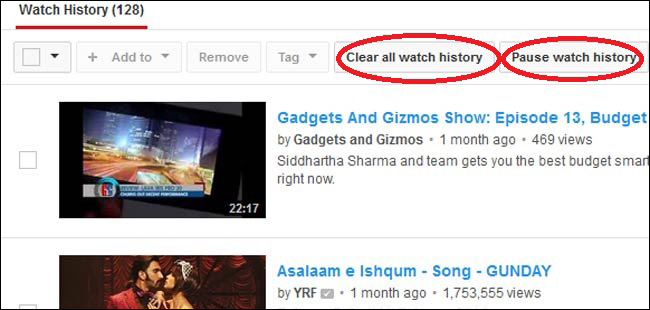
युट्युवमा तपाईले हेरेका भिडियोको रेकर्ड मेटाउन एड्रेस बारमा youtube.com/my_history टाइप गर्नुहोस्, त्यहाँ तपाइले हेरेका सवै भिडियोको सूची देखिने छ ।
youtube_031014041354
भिडियोको रेकर्ड मेटाउन त्यहाँ रहेको Clear all watch history क्लिक गर्नुहोस् । आगामी दिनमा आफुले हेरेका भिडियो रेकर्ड नरहोस भन्ने चाहानुहुन्छ भने Pause Watch history थिच्नुहोस् ।
२. क्रोम ब्राउजरमा
क्रोम ब्राउजरमार्फत् तपाईले गरेका गतिबिधि कम्पुटरमा मात्र हैन, जीमेल अकाउन्टमा पनि जोडिएको हुन्छ । जसले गर्दा तपाईले अर्को कुनै कम्प्युटरमा गएर आफ्नो जीमेल लगइन गरी क्रोम चलाउन थाल्नुभयो भने अन्यत्रै चलाएको डाटा रेकर्ड पनि देखिन्छ ।
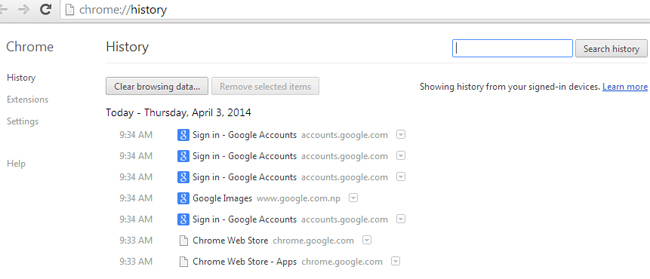
chrome-histryक्रोम ब्राउजरमा हिष्ट्री मेटाउन एड्रेस बारमा  chrome:history टाइप गरेर वा सिधै Ctrl H टाइप गरेर ब्राउजर हिष्ट्री हेर्न सक्नुहुन्छ । यहाँ तपाईले कुन मितिमा के हेर्नुभयो भन्ने सम्पूर्ण रेकर्ड देखिने छ । यदि तपाई हिष्ट्री मेटाउन चाहानुहुन्छ भने clear browsing data क्लिक गर्नुहोस् । यदि तपाई क्रोममा आफ्नो हिष्ट्री नरहोस भन्ने चाहानुहुन्छ भने Incognito मोडमा चलाउनुपर्ने हुन्छ । यसका लागि क्रोममा लगइन गर्नुभएको छ भने लगआउट गर्नुहोस् र Ctrl+Shift+N  थिच्नुहोस् । अब तपाई सुरक्षित मोडमा ब्राउज गर्न सक्नुहुनेछ ।
३. इन्टरनेट एक्सप्लोररमा
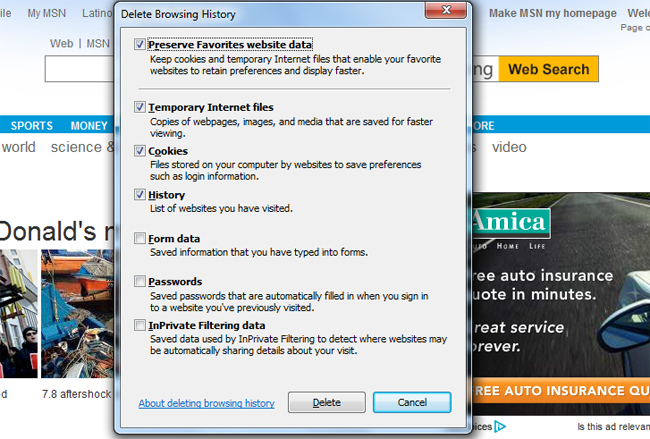
यदि तपाई इन्टरनेट एक्सप्लोररमा सुरक्षित आफ्नो डाटा हटाउन चाहानुहुन्छ भने Ctrl+Shift+Delete  क्लिक गर्नुहोस र सवै डाटा डिलिट गर्नुहोस्
ie-historyआफ्नो ब्राउजिङ इतिहासको रेकर्ड नरहोस भन्ने चाहानुहुन्छ भने प्राइभेट ब्राउजिङ अप्सनमा जान सक्नुहुन्छ । Ctrl+Shift+P  थिचेपछि तपाईका लागि नयाँ विन्डो खुल्ने छ । यो प्राइभेट ब्राउजिङ मोडमा तपाईले खोलेका साइटको सूचना ब्राउजरमा रहने छैन् ।
४. फायरफक्समा
यदि तपाई मोजिला फायरफक्स ब्राउजर चलाउनुहुन्छ भने यसको टम मेनुबारमा History  अप्सन हुन्छ । त्यो क्लिक गरेपछि Clear Recent History.. देख्नुहुनेछ त्यसलाई क्लिक गरेपछि नयाँ विन्डो आउँछ । सिधै Ctrl+ Shift+ Delete क्लिक गरेर पनि जान सकिन्छ । यो विन्डोमा तपाई कति सयमको डाटा हटाउने र कुन– कुन डाटा हटाउने भन्ने छनौट गर्न सक्नुहुन्छ ।
फायरफक्समा प्राइभेट ब्राउजिङ अप्सनको प्रयोग गरि आफ्ना डाटा सुरक्षित राख्न सकिन्छ । यसका लागि अप्सनमा गएर बिभिन्न सेटिङमार्फत् आफ्नो ब्राउजिङलाई सुरक्षित गर्न सकिन्छ ।

Sunday, December 15, 2013

विश्वका अदभुत दश पुर्वाधार आयोजना


विश्वका अदभुत दश पुर्वाधार आयोजना, कसरी बने होलान् यी ? 


विश्वमा आश्चर्यको कमी छैन् । विज्ञानको विकासले यस्ता अदभुत पुर्वाधारको विकास सम्भव भएको हो । सम्थिङटप्सले तयार गरेको विश्वका यस्तै आश्चार्यजनक १० पुर्वाधार परियोजनामा सबैभन्दा गहिरो खानीदेखि अग्लो बुर्ज दुवई भवन समेटिएको छ । 
 
मोपेङ खानी, दक्षिण अफ्रिका


मोपोङ शव्दले सायदै कुनै अर्थ देला तर यो विश्वकै गहिरो खानी हो । पहेंलो धातु सुनको खोजीमा मोपेङमा मानिस पृथ्वीको ३.५ किलोमिटर गहिराईमा पसेका छन् । इम्पायरस्टेट जस्ता १० वटा भवन यो खानीको गहिराईमा सहजै समेटिन सक्छन् । यो खानीबाट दैनिक छ हजार मेट्रिक टन ढुंगा निकालिन्छ र त्यसमा सुनको खोजी गरिन्छ । यो खानीबाट एक औंस सुन निकाल्न पाँचसय ५० अमेरिकी डलर खर्च पर्ने गरेको छ । अहिले सुनको मुल्य एक औसको एकहजार छ सय डलरभन्दा बढी छ । यो खानीमा ५५ लाख औंस सुन भएको विश्वास गरिन्छ ।
 
बुर्ज खलिफा, दुवई
 
 सन् २०१० मा बनेको बुर्ज खलिफा आठसय २८ मिटर अग्लो छ । यसमा एकसय ६२ तला छ । यो भवन बनाउन करिव १.५ अर्ब अमेरिकी डलर खर्च भएको थियो । यो विशाल भवनको झ्यालमात्र सफा गर्न १२ बटा क्रेन र ३६ जना मानिसलाई तीन महिना लाग्छ । यसमा २४ हजार आठसय ३० झ्याल छन् । 

ट्रन्स साइवेरियन रेल


यदि तपाई थोमस द ट्यांक इन्जिनबाट ट्रन्स साइवेरियन रेलमार्गको दुरी नाप्दै हुनुहुन्छ भने विश्व भ्रमण नै गरेको लाग्न सक्छ । विस्तारै हिडने त्यो रेलले नौहजार दुईसय ५९ किलोमिटर पार गर्दा यस्तो लाग्नु स्वभाविक हो । यो रेलमार्गले पुर्वमा जापानी समुद्र नजिकको भ्लादिभोस्कतदेखि मध्य युरोप नजिकको सहर रिंगालाई जोडदछ । सोभियत संघ विशाल हुदाँ यो रुसको लाइफ लाइन नै थियो । विसौ शताव्दीको आश्चर्यजनक वैज्ञानिक उपलव्धि मानिएको यो रेलमार्ग सन् १९१६ मा बनेको हो । यो रेलमार्गले रुसको ८० प्रतिशत औद्योगिक क्षेत्रलाई जोडनुका साथै आयात र निर्यातका ३० प्रतिशत सामान यही रेलले ढुवानी गर्दछ ।

गोथार्ड वेस टनेल, स्विटजरल्याण्ड

स्विट्जरल्याण्डको पर्वतीय भुभाग मुनी बनिरहेको सुरुङ विश्वकै लामो रेलमार्गको सुरुङ हो । हाल निर्माणमा रहेको यो सुरुङ मार्ग सन् १९१७ मा निर्माण सम्पन्न भएपनि ५६.३ किलोमिटर लामो हुनेछ । अहिले सबैभन्दा लामो मानिएको जापानको समुद्र मुनीको साइकन सुरुङभन्दा यो लामो हुनेछ । यो आयोजनामा कुल ८.४ अर्ब युरो खर्च हुने अनुमान छ । अल्पपर्वत मुनी ४० किलोमिटरको फरकमा दुईवटा सुरुङ मार्ग हुने छन् र तिनको कुल लम्बाई एकसय ५३ किलोमिटर हुने छ । यि सुरुङ समुद्र सतहबाट पाँचसय मिटरको गहिराईमा हुने छन् । यो आयोजना बनिसक्दा करिव दुई करोड ४० लाख टन ढुंगा निस्कनेछ ।

अरेसियो बेदशाला, प्युटोरियो
 
 
चलचित्र गोल्डेन आई वा कन्ट्याक्टमा देखाइएको भव्य संरचना तपाईलाई याद होला । विश्वकै ठुलो दुरविन स्थापना गरिएको यो बेदशाला हेर्न प्रत्येक वर्ष करिव एक लाख पर्यटक आउने गर्छन् । यो बेदशालाको व्यास तीनसय चार दशमलव आठ मिटर रहेको छ । यो बेदशालाको दुरबिनले अन्तरिक्षमा अनेकन तारा, उल्का र तारामण्डल पत्ता लगाउन सहयोग गरेको छ । शुक्रको विस्तृत अध्ययन र उल्कापिण्ड बारेमा अध्ययन यसैबाट गरिएको हो ।

नुरेक बाँध ताजकिस्तान

ताजकिस्तानको वक्स नदिमा बनेको नुरेक बाँध विश्वकै अग्लो बााध हो । सन् १९८० मा बनेको यो बाँध तीनसय पाँच मिटर अग्लो छ । यसबाट ताजकिस्तानलाई आवश्यक ९८ प्रतिशत बिजुली प्राप्त हुन्छ । यो आयोजना बनाउन १९ वर्ष लागेको थियो । ७० किलोमिटर लामो र ९८ वर्ग किलोमिटरमा फैलिएको यो बाँधमा १०.५ क्युविक मिटर पानी संकलन गर्न सकिन्छ ।

चीनको हाङझोउ पुल

हाङझोउ पुलले बन्दरगाहा शहर क्विन्दोलाई हुन्दाओद्घीपसँग जोडछ । यो पुलको लम्बाई ४२.४ किलmोमिटर र फैलावट ३३.५ मिटर रहेको छ । चार वर्षमा निर्माण सम्पन्न गरिएको यो पुल छ अर्ब युरोमा बनेको हो । अमेरिकाको लुजियानमा रहेको पहिलेको लामो पुलभन्दा यो पाँच किलोमटिर लामो छ । चीनले अहिले ग्वाङदोङ मुख्यभुमीलाई हङकङ र मकाउसँग जोडने ४८.२ किलोमिटर लामो पुल निर्माण गरिरहेको छ । यो पुल ७.२ अर्बको लगानीमा सन् २०१६ मा निर्माण सम्पन्न हुनेछ ।

लाङगीलेड पाइपलाइन

नर्वेबाट प्राकृतिक ग्यास बेलायत ल्याउन समुद्रमुनी यो पुल बनाइएको छ । सन् २००४ मा यो पुलको निर्माण सुरु भयो र दुई वर्षमा समाप्त भयो । एकहजार दुईसय किलोमिटर लामो यो पाइप लाइनमा दशलाख टन स्टिलको प्रयोग भएको छ । यसबाट प्रत्येक वर्ष अधिकतम २५.५ अर्ब क्युविक मिटर ग्यास बेलायत ल्याउन सकिन्छ । यो आयोजनाको लागत १.७ अर्ब पाउण्ड थियो ।

लार्ज हार्डोन कोलाइडर, स्विटजरल्याण्ड

पृथ्वीको उत्पत्ति सम्वन्धि बिग ब्याङ सिद्धान्तको परिक्षण गर्न जमीन मुनी बनाइएको सुरुङ हो, लार्ज हार्डोन कोलाइडर, । आणविक विच्छेदनद्घारा सिद्धान्तको पुस्टी गर्ने यो विश्वकै महंगो वैज्ञानिक आयोजना हो । यसमा २७ किलोमिटर लामो सुरुङ बनाउन तीन अर्ब पाउण्ड खर्च भएको छ भने विश्वका ३५ सय वैज्ञानिक यसमा सहभागी छन् । यसमा परिक्षण गर्ने क्रम जारी छ ।

मिल्लाउ भाइडक्ट

फ्रान्समा रहेको सबैभन्दा अग्लो तारले अड्याएको सडक पुल मिल्लाउ भाइडक्ट हो । दुईहजार चारसय ६० मिटर लामो यो पुल ४० करोड युरोको लागतमा बनेको हो । यसको उचाई दुईसय २१ देखि दुईसय ४५ मिटरसम्म छ । 

यादवराज जोशी/बिजमाण्डू

श्रोत : यादवराज जोशी/बिजमाण्डू


विश्वमा आश्चर्यको कमी छैन् । विज्ञानको विकासले यस्ता अदभुत पुर्वाधारको विकास सम्भव भएको हो । सम्थिङटप्सले तयार गरेको विश्वका यस्तै आश्चार्यजनक १० पुर्वाधार परियोजनामा सबैभन्दा गहिरो खानीदेखि अग्लो बुर्ज दुवई भवन समेटिएको छ । - See more at: http://www.bizmandu.com/content/-5350.html#.Uq6T1VLM_KQ

विश्वका अदभुत दश पुर्वाधार आयोजना, कसरी बने होलान् यी ?

Print Email   प्रकाशित मिति: Dec 14, 2013  117  1  1  0
विश्वमा आश्चर्यको कमी छैन् । विज्ञानको विकासले यस्ता अदभुत पुर्वाधारको विकास सम्भव भएको हो । सम्थिङटप्सले तयार गरेको विश्वका यस्तै आश्चार्यजनक १० पुर्वाधार परियोजनामा सबैभन्दा गहिरो खानीदेखि अग्लो बुर्ज दुवई भवन समेटिएको छ ।
- See more at: http://www.bizmandu.com/content/-5350.html#.Uq6T1VLM_KQ
विश्वका अदभुत दश पुर्वाधार आयोजना, कसरी बने होलान् यी ? - See more at: http://www.bizmandu.com/content/-5350.html#.Uq6T1VLM_KQ

Tuesday, July 30, 2013

नौ हजार नपर्ने नौ एण्ड्रोइड फोनहरु

स्मार्टफोन, आवश्यकता बनिसक्यो यतिखेरको। कम्प्युटरको जस्तै सुविधा अनि इन्टरनेटसँग हरदम जोडिइरहने भएकाले यसले मानिसलाई स्मार्ट पनि बनाएको छ। त्यसमा पनि पहिले कल्पना नै नगरिएका सुविधा उपलब्ध छ।
सुविधा र सेवासँगै स्मार्टफोनहरु महँगा मात्र रहेनन्। सुविधा थपिँदै जाँदा सस्ता स्मार्टफोनको बजार प्रवेश पनि बढिरहेको छ। विशेष भारत र चिनका ठूला मोबाइल बजारका कारण सस्तो मोबाइल सेटको उत्पादनमा बढेको प्रतिस्पर्धाले नेपालीलाई पनि स्मार्टफोन सस्तोमा उपलब्ध भएको छ। जसले गर्दा स्मार्टफोनहरु १० हजार नै नतिरी पाउन सकिन्छ। जसमा विश्वमा स्थापित भएका ब्राण्डका ३० ४० हजारका मोबाइल सरहका सुविधाहरु पनि रहेका हुन्छन्।
स्पाइस स्मार्ट फ्लो पीस मी ४२२
02 Cheaper Smart Phones_Smart Phones under 10 thousends_Dus Hajar Bhanda Sasta Mobile_Cheaper Mobiles in Nepal_Android Phones Spice Smart Flo Pace Mi-422४ इन्चको स्क्रिन रहेको यो फोनमा एण्ड्रोइडको आइस्क्रिम स्याण्डबीच अपरेटिङ सिस्टम रहेको छ। ३.२ मेगापिक्सलको मुख्य क्यामेरा र १.३ मेगापिक्सलको फ्रन्ट क्यामेरा रहेको यो फोनमा दुई सीम चलाउन सकिन्छ। लामो समय टिक्ने ब्याट्रीका साथ ५१२ एमबीको रयाम रहेको यो फोनमा ३२ जीबी सम्मको मेमोरी सुविधा लिन सकिन्छ। जुन आठ हजारमा नै आफ्नो बनाउन सकिन्छ।
कार्बन ए ६ 
03 Cheaper Smart Phones_Smart Phones under 10 thousends_Dus Hajar Bhanda Sasta Mobile_Cheaper Mobiles in Nepal_Android Phones Karbonn A6आइस्क्रिम स्याण्डवीच अपरेटिङ सिस्टममा चल्ने यो फोनमा ४ इन्चको डब्लुभीजीए स्क्रिन रहेको छ। ५ मेगापिक्सलको क्यामेरा रहेको यो फोनमा दुई सीमकार्ड चलाउन सकिन्छ। ५१२ एमबीको रयाम रहेको यो फोनको मेमोरी क्षमतालाई ३२ जीबी सम्म बढाउन सकिन्छ। १ गीगाहर्जको प्रोसेसर रहेको फोनमा एफएम रेडियोको सुविधा पनि छ। १४५० एमएएचको शक्तिशाली ब्याट्री रहेको फोन आठ हजारमा नै आफ्नो बनाउन सकिन्छ।
सामसुङ ग्यालेक्सी स्टार 
04 Cheaper Smart Phones_Smart Phones under 10 thousends_Dus Hajar Bhanda Sasta Mobile_Cheaper Mobiles in Nepal_Android Phones Samsung Galaxy Star S5282दुई सीम चलाउन सकिने यो फोन एण्ड्रोइडको जेली बीनमा चल्छ। २.९ इन्चको डिस्प्ले र २ मेगापिक्सलको क्यामेरा रहेको फोनमा ४ जीबीको आन्तरिक मेमोरी रहेको छ। जसलाई ३२ जीबी सम्म बढाउन सकिन्छ। १ गीगाहर्जको प्रोसेसर र ५१२ एमबी रयाम रहेको फोनमा १२०० एमएएचको ब्याट्री रहेको छ। यो फोन नौ हजारमा भित्रमा नै आफ्नो बनाउन सकिन्छ।
कार्बन स्मार्ट ए २ 
05 Cheaper Smart Phones_Smart Phones under 10 thousends_Dus Hajar Bhanda Sasta Mobile_Cheaper Mobiles in Nepal_Android Phones Karbonn Smart A2आठ हजार भित्रमै आफ्नो हातमा पार्न सकिने यो फोनमा ४ इन्चको डिस्प्ले रहेको छ। ३ मेगापिक्सलको क्यामेरा रहेको फोनमा दुई सीम चलाउन सकिन्छ।३२ जीबीसम्म मेमोरी क्षमता बढाउन सकिने फोनमा २०० एमबीको आन्तरिक मेमोरी क्षमता रहेको छ।१७५० एमएएचको शक्तिशाली ब्याट्री रहेको फोनमा एफएम रेडियो समेत छ। यो फोन आठ हजार भन्दा केही कममा आफ्नो बनाउन सकिन्छ।
हुवावे एसेण्ड वाइ २१० डी 
06 Cheaper Smart Phones_Smart Phones under 10 thousends_Dus Hajar Bhanda Sasta Mobile_Cheaper Mobiles in Nepal_Android Phones Huawei Ascend Y210Dयो फोनमा ३.५ इन्चको डिस्प्ले रहेको छ भने २ मेगापिक्सलको क्यामेरा रहेको छ। दुई सीमकार्ड राख्न सकिने यो फोनको अपरेटिङ सिस्टम एण्ड्रोइड जिन्जरब्रेड हो। दुई सीम चलाउन सकिने फोनमा २५६ एमबीको रयाम छ भने ३२ जीबी सम्म मेमोरी क्षमता प्रयोग गर्न सकिन्छ। १ गीगाहर्जको प्रोसेसर रहेको फोनमा १७०० एमएएचको ब्याट्री रहेको छ। लामो समय ब्याकअप दिने यो फोन आठहजार पाँचसयमा नै आफ्नो बनाउन सकिन्छ।
इन्टेक्स एक्वा स्टार 
07 Cheaper Smart Phones_Smart Phones under 10 thousends_Dus Hajar Bhanda Sasta Mobile_Cheaper Mobiles in Nepal_Android Phones Intex Aqua Starदुई सीम लाग्ने यो फोन ४ इन्चको डिस्प्ले भएको फोन हो। जसमा फ्ल्यास सहित ३ मेगापिक्सलको मुख्य क्यामेरा रहेको छ। एण्ड्रोइड जीन्जरब्रेड अपरेटिङ सिस्टम रहेको यो फोनमा १ गीगाहर्जको प्रोसेसर रहेको छ भने यसको मेमोरी क्षमतालाई ३२ जीबी सम्म बढाउन सकिन्छ। यो फोन आठहजार भन्दा केही सय कममा नै आफ्नो बन्न सक्छ।
लाभा आइरिस ४०१ इ 
08 Cheaper Smart Phones_Smart Phones under 10 thousends_Dus Hajar Bhanda Sasta Mobile_Cheaper Mobiles in Nepal_Android Phones Lava Iris 401eलाभाको यो फोनमा ४ इन्चको डिस्प्ले रहेको छ भने ३ मेगापिक्सलको मुख्य क्यामेरा छ। १५०० एमएएचको शक्तिशाली ब्याट्री रहेको यो फोनमा १ गीगाहर्जको प्रोसेसर र २५६ एमबीको रयाम छ। दुई सीम लाग्ने फोनमा एफएम रेडियो छ। भने यसको अपरेटिङ सिस्टम एण्ड्रोइडको जीन्जरब्रेड हो। यो फोन सात हजार पाँच सयमा नै आफ्नो बन्नसक्छ।
भिडियोकोन ए २२
09 Cheaper Smart Phones_Smart Phones under 10 thousends_Dus Hajar Bhanda Sasta Mobile_Cheaper Mobiles in Nepal_Android Phones Videocon A22सातहजार पाँच सयमा नै आफ्नो बनाउन सकिने यो फोनमा ३.५ इन्चको डिस्प्ले रहेको छ। ३ मेगापिक्सलको क्यामेरा रहेको यसमा २५६ एमबीको रयाम रहेको छ। यसमा १६ जीबी सम्म मेमोरीको प्रयोग गर्न सकिन्छ। १ गीगाहर्जको प्रोसेसर रहेको यसमा दुई सीम चलाउन सकिन्छ। एण्ड्रोइडको जीन्जरब्रेड अपरेटिङ सिस्टममा चल्ने यो फोनमा १५०० एमएएचको ब्याट्री रहेको छ।
माइक्रोम्याक्स आइशा ए ५२ 
10 Cheaper Smart Phones_Smart Phones under 10 thousends_Dus Hajar Bhanda Sasta Mobile_Cheaper Mobiles in Nepal_Android Phones Micromax Aisha A52भारतीय मोबाइल उत्पादकको यो फोनमा दुई सीमकार्ड चलाउन सकिन्छ। ३.२ इन्चको डिस्प्ले रहेको यसमा २ मेगापिक्सलको क्यामेरा रहेको छ। माइक्रोएसडी मार्फत ३२ जीबीसम्म मेमोरी बढाउन सकिने फोनमा १ गीगाहर्जको प्रोसेसर रहेको छ। एफएम रेडियो बजाउन सकिने फोन एण्ड्रोइडको जीन्जरब्रेडमा चल्छ। यो फोन सातहजारमा आफ्नो बनाउन सकिन्छ।
उल्लेख भएका मूल्यहरु बार्गेनिङ गरेर घटाउन सकिने भएकाले केही तलमाथि हुनसक्छ। (सम्पादक)